|
Setting up your camera (cont'd) In the last topic we covered resolution and setting image quality. So you need to make these settings on your camera before doing anything else. It is not possible to give step by step instructions for this, as there are so many cameras and they are all different, but you normally get a quick start guide and what you need will be in there. Sometimes instead of a separate quick start guide, the first part of the manual covers just the essentials with the full details in the second part. While there, you will notice that they tell you to fully charge the battery before use the first time. It is good practice to make sure that your battery is also fully charged before any important shoot, particularly if you have not used the camera for a while. The battery is still supplying power even when the camera is turned off (it has to maintain the date/time and batteries have internal resistance which causes them to slowly drain). It is a good idea to buy a spare battery so that if your camera runs down in the field, you can swap to continue, and charge up the exhausted battery when you get home, or somewhere with a mains outlet. If you have to swap batteries the date and time are maintained by a charged capacitor, but the time this will last for is limited, so put the spare battery in straight after taking the old one out. If you leave your camera for several weeks with a dead battery, or the battery taken out you will find you need to reset the date and time when you do put in a fresh battery. Also, if you are going to store your camera unused for a considerable time, take the battery out, but recharge it before use.
So let's get started. |
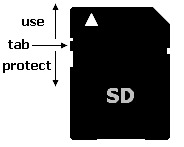 One final point;
make sure you have the correct form of memory card, there are several different
types. Again it is worthwhile having at least one spare card so that you don't
have to start deleting when you run out of memory. Note that cards have a write
protect tab. If your camera can't use a card check that you do not have this in
the wrong position.
[ next ]